Comprehensive Keybinds






A FoundryVTT module that adds keybinds to standard Foundry actions.
Overview
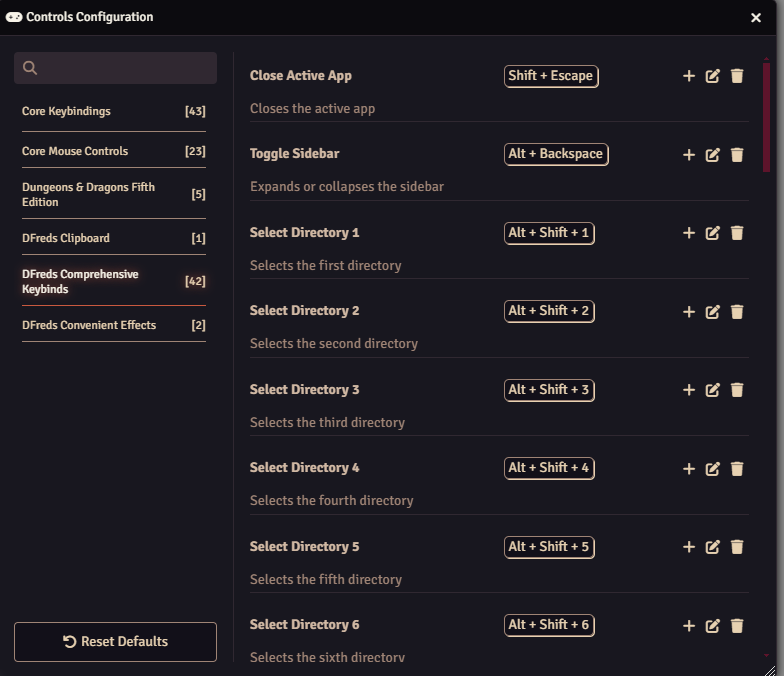
Comprehensive Keybinds adds keyboard shortcuts for actions that Foundry only exposes through the interface: selecting scene controls, selecting the tools within them, and switching sidebar directories. It also binds toggling directory expansion, changing the message mode, and closing the most recent window. Every keybind is rebindable through Foundry's own controls configuration.
Features
- Adds keybindings for the following actions:
- Control selection (tokens, lights, templates, etc.)
- Default keybinds are Ctrl + (1-9, 0, -, =)
- Tool selection (within tokens, selection, measure, etc.)
- Default keybinds are Ctrl + Shift + (1-9, 0, -, =)
- Directory selection (actors, items, scenes, etc.)
- Default keybinds are Shift + Alt + (1-9, 0, -, =)
- Toggling directory expansion
- Default keybind is Alt + Backspace
- Changing message mode (public, GM, blind, self, IC)
- Default keybinding is Ctrl + Alt + (Arrow keys, Numpad 0)
- Closing the most recent active window only
- Default keybinding is Shift + Escape
- Closing all open windows
- No default keybinding. Bind Close Active App to Escape and this to Shift + Escape to swap Foundry's default Escape behavior
- Control selection (tokens, lights, templates, etc.)